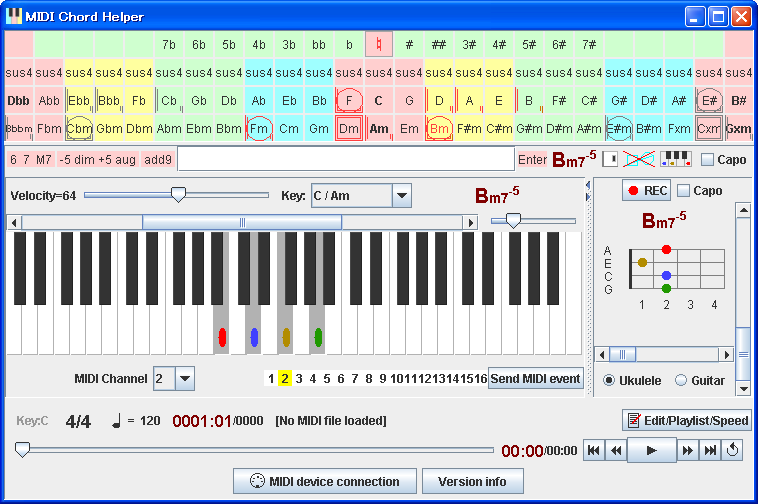
This software visualizes chord progression of your MIDI files.
You can play the music by clicking chord symbols.
After clicking chord, you can play
arpeggio by rotating mouse wheel.
Description
Welcome to MIDI Chord Helper page ! You can play the music easily by clicking chord symbols on this software, and can find out chord diagram
for keyboard, ukulele, and guitar.
The chord buttons are placed by order of the Circle of Fifths,
and four background colors which indicates the feeling (
Pink:Local,
Yellow:Hot,
Blue:Cool,
Green:Remote
) can be shifted by clicking key signature button,
so you can understand key & chord's relationship visually and easily.
MIDI recording/editing/playing, connecting to external MIDI IN/OUT devices
also available with this software.
You can enjoy and learn about music chord progression by watching the shapes
(+, square, circle etc.) appered on the chord buttons.
If you created new MIDI file, please try to play it on this software.
and you can find mismatch between meta-event (key signature, time signature, tempo, lyric etc)
and other event (notes, chords, and its timing, etc).
Note: Some extended chords / added chords (-9/+9/11/13 etc.) are not supported. Supported chords are: X9, Xadd9, X69, XM9 etc.
Original musical chord instrument, with accordion-like chord
C, Am button placed vertically, and with MIDI interface,
Kamide(Auther's name)-on(Pronounciation of the Kanji "音" which mean "sound")
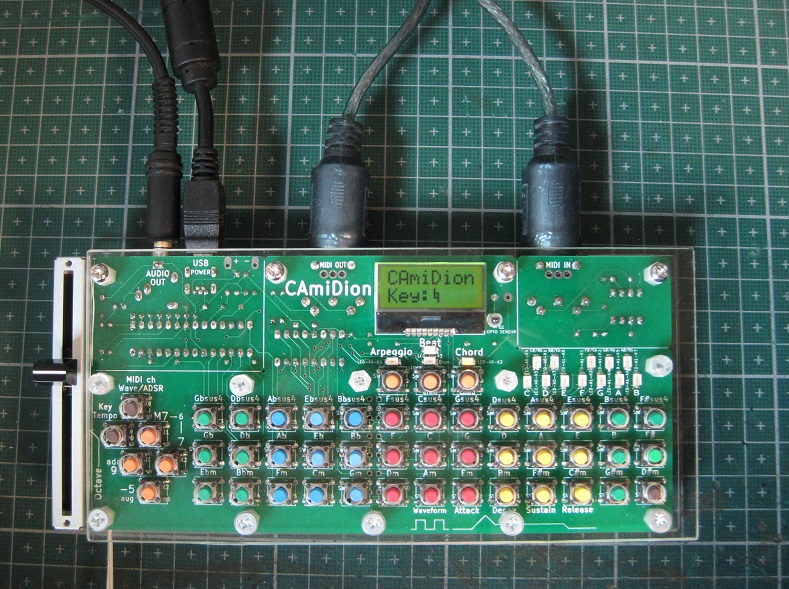
I implemented the MIDI Chord Helper software's chord button as hardware,
electronic musical instrument "CAmiDion".
In May 2009, I visit Make:Tokyo Meeting 03 held in Tama-Center, and purchaced
"Arduino Wo Hajimeyo Kit" (= beginner's kit) which includes Arduino Duemilanove.
Then, the first version of CAmiDion was implemented using the Arduino Duemilanove and two YMZ294 square-wave chips
to support 3x2=6 polyphonic sound. This instrument was exhibited first in Niconico Gijutsu-bu
(= technology group of Niconico Douga users) exhibition and presentation event
held in Kawasaki (a city between Yokohama and Tokyo), Aug 2009.
Subsequently, I altered to newer CAmiDion many time, to exhibit on Make:Tokyo Meeting 04/05/06/07
(in Tokyo Institute of Technology Ookayama campus),
Maker Faire Tokyo 2012/2013 (in Kagaku-Miraikan, Odaiba-area), and some other exhibition/presentation events
(full list is here).
The newest (in 2014) CAmiDion has software-implemented sound synthesizer,
which supports ADSR envelope, wavetable-based 6 polyphonic sound
(sine/square/sawtooth/triangle/sine-shepard-tone/noise waves),
so external sound chip not required. Audio output is simply CR low-pass filtered PWM.
Controlled and sounded by ATMEGA328P (same chip as Arduino Duemilanove).
Until Apr. 2014, I implemented CAmiDions on universal circuit board with hand-wiring.
After that, I designed CAmiDion's PCB (printed circuit board) with KiCad, ordered to PCB manufactureing service,
and implemented CAmiDion with the PCB.